
Summary
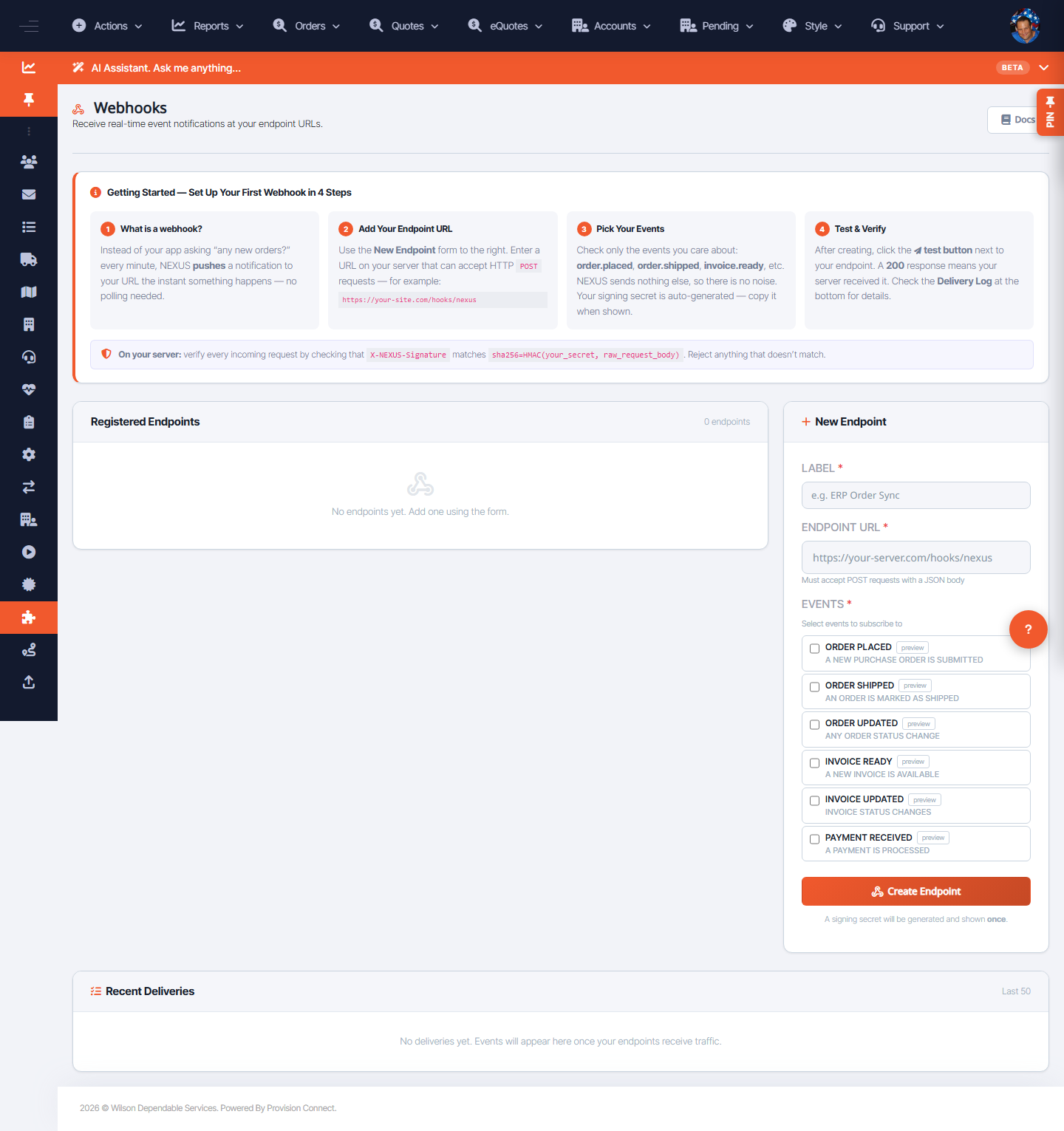
Register a webhook so NEXUS posts event payloads to your URL when key events occur. Choose which events to subscribe to and monitor recent deliveries.
Before you start
- Required role: Admin or Developer
- Have a public HTTPS endpoint ready to receive POSTs
Steps
- Go to Integrations ? NEXUS API ? Webhooks (
/nexus_webhooks.cfm). - Under New Endpoint, enter a Label and the Endpoint URL. _(Fields: "Label *", "Endpoint URL *")_
- Select Events: Order Placed, Order Shipped, Order Updated, Invoice Ready, Invoice Updated, Payment Received. _(Use preview to see each payload shape)_
- Click Create Endpoint.
- Watch Recent Deliveries to confirm events are arriving.
What success looks like
The endpoint appears under Registered Endpoints, and triggered events show as successful deliveries.
Gotchas / troubleshooting
- Use preview to see the JSON
typeand payload before you build your handler. - Failing deliveries in Recent Deliveries usually mean your endpoint returned a non-2xx or timed out.
Related
- Create a NEXUS API credential
- View API usage