
Summary
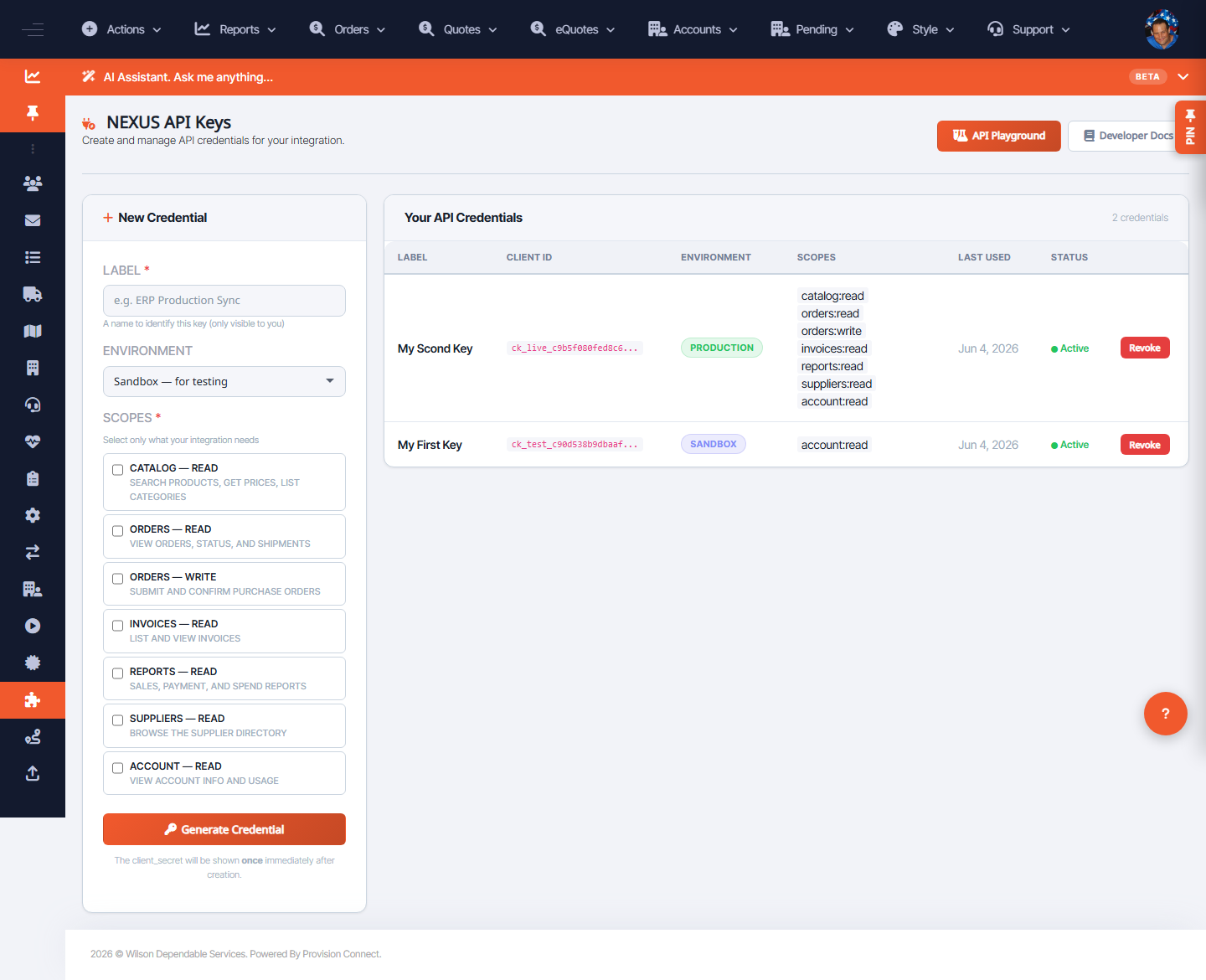
Create scoped API credentials so an outside system can call the NEXUS API. Each credential has a label, an environment, and a set of scopes that limit what it can do.
Before you start
- Required role: Admin or Developer
- Decide which environment and the minimum scopes the integration needs
Steps
- Go to Integrations ? NEXUS API ? API Keys (
/nexus_api_keys.cfm). - Click New Credential.
- Enter a Label and choose the Environment. _(Fields: "Label *", "Environment")_
- Select Scopes (least privilege): Catalog — Read; Orders — Read; Orders — Write; Invoices — Read; Reports — Read; Suppliers — Read; Account — Read. _(Field: "Scopes *")_
- Click Generate Credential.
- Copy the secret now — it is shown once.
What success looks like
The credential appears in Your API Credentials with its Client ID, environment, scopes, last-used, and status.
Gotchas / troubleshooting
- Grant only the scopes the integration needs; "Orders — Write" lets the client submit/confirm POs.
- The secret is shown once at generation; if lost, rotate by creating a new credential.
Related
- Test requests in the API Playground
- View API usage
- Create a webhook endpoint