
Summary
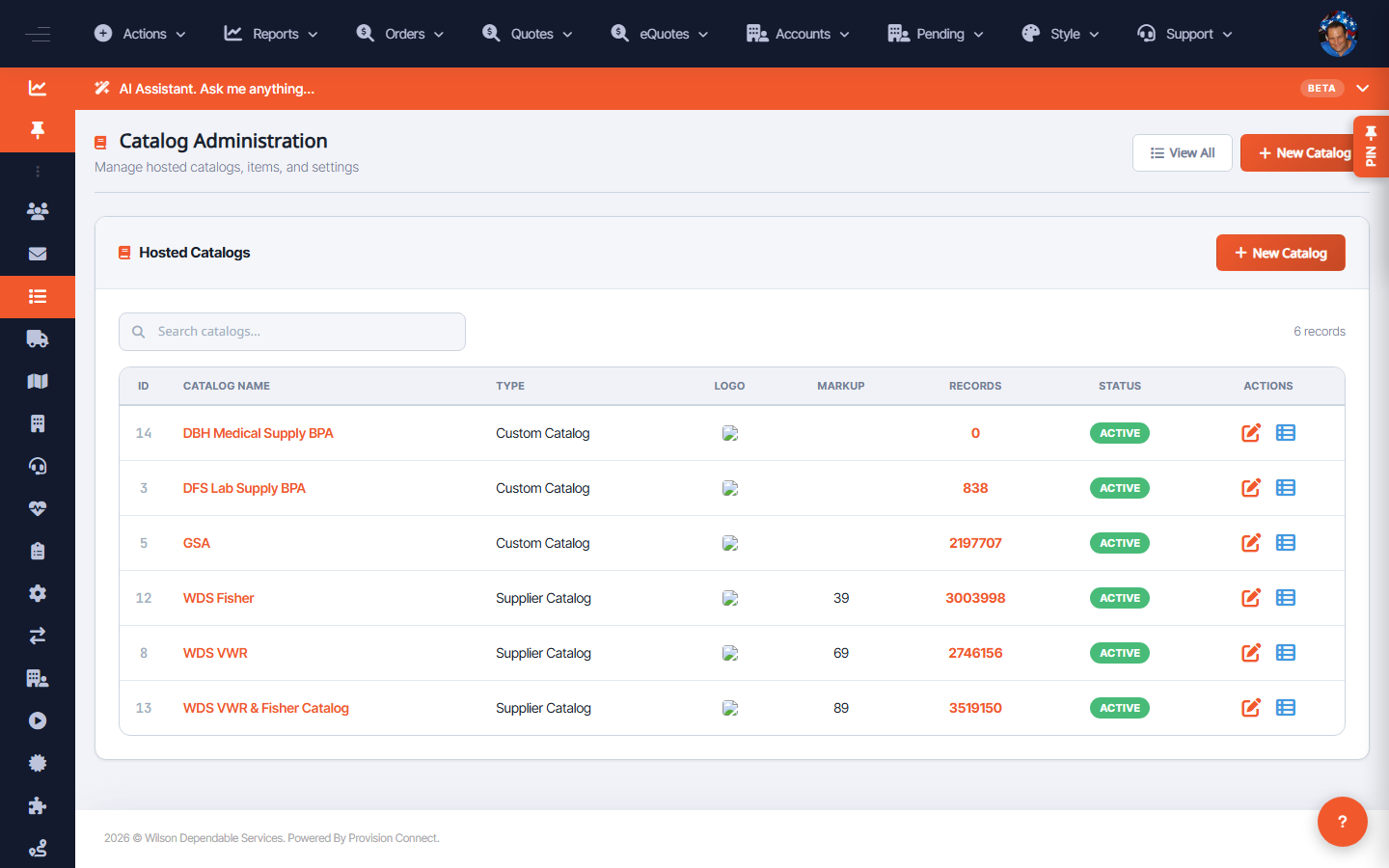
Catalog Administration lists every hosted catalog for the tenant with its ID, name, type (Supplier or Custom), logo, markup percentage, record count, and status. Use it to review coverage and open a catalog for edits.
Before you start
- Required role: Admin or Catalog Manager
Steps
- Go to Catalog Administration (
/catalog.cfm?catalog_view=1). _(Columns: ID, Catalog Name, Type, Logo, Markup, Records, Status, Actions)_ - Review each catalog's Markup and Records to confirm pricing and coverage.
- Use the row Actions to edit a catalog's settings or open its items.
- Use New Catalog to add another, or View All to see the full list.
What success looks like
You can see at a glance which catalogs are active, how many records each holds, and what markup is applied (e.g. supplier catalogs WDS VWR, WDS Fisher carry their own markup %).
Gotchas / troubleshooting
- Markup shown on supplier catalogs is the percentage applied over supplier cost; custom/BPA catalogs may show no markup.
- A catalog with a large record count that suddenly drops may indicate a failed supplier feed — check FTP/EDI.
Related
- Create a hosted catalog
- Manage catalog products