
Summary
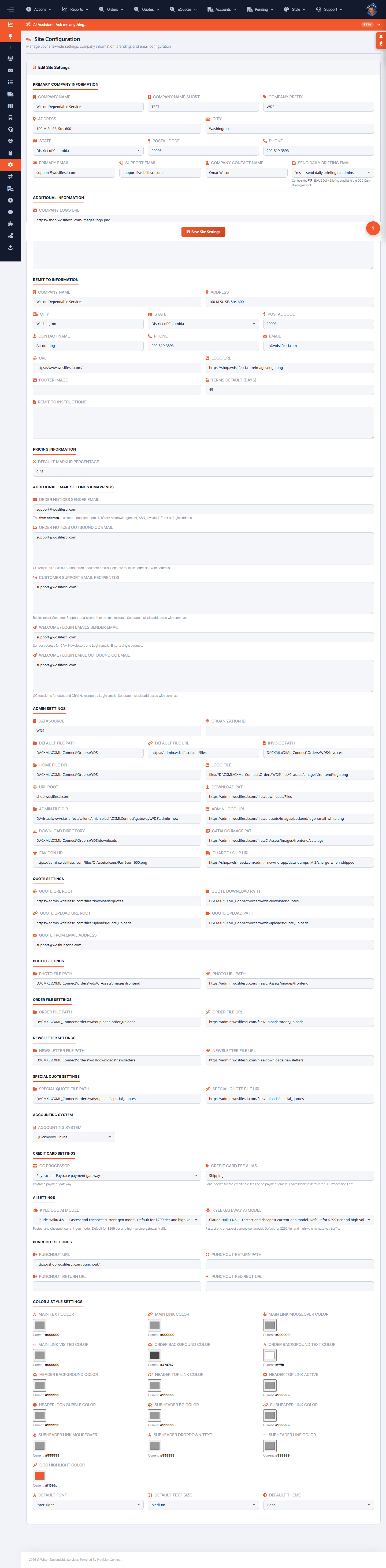
Site Settings holds the tenant's core configuration: company identity, addresses and contacts, default payment terms, default markup, logos/branding, and the sender/CC addresses used for order and welcome emails.
Before you start
- Required role: Admin
Steps
- Go to Configuration ? Site Settings (
/site_settings.cfm?settings=1). - Click Edit Site Settings.
- Set company identity: Company Name, Company Name Short, Company Prefix, Address/City/State/Postal, Phone, Primary Email, Support Email, Company Contact Name.
- Set defaults and branding: Terms Default (days), Default Markup Percentage, Remit To Instructions, Company Logo URL, Footer Image, Company Text, URL.
- Set notification routing: Order Notices Sender Email / Outbound CC, Customer Support Email Recipient(s), Welcome / Login Emails Sender Email / Outbound CC.
- Toggle Send Daily Briefing Email if you want the daily summary.
- Save.
What success looks like
The tenant's branding, terms, markup, and email routing reflect your changes across the storefront and outbound emails.
Gotchas / troubleshooting
- Default Markup Percentage here is the fallback; catalog-level markup can override it.
- Wrong Sender/CC emails are a common cause of missed order or welcome notifications.
Related
- Manage tenants / client analytics
- Manage books (pricing books)